Globe SIM Register | How to Register Globe SIM | Check Registration Status at new globe.com.ph.simreg
Welcome to the most comprehensive resource for Globe SIM registration. Whether you are a long-time subscriber, a new user, or a tourist visiting the Philippines, ensuring your mobile number is legally registered is the only way to keep your line active.
Globe SIM Register
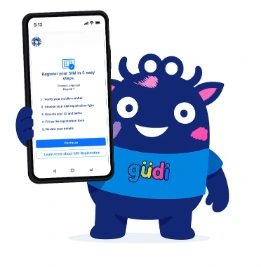
The Globe SIM register mandate is a requirement under Philippine law (Republic Act No. 11934). This law aims to curb SMS-related scams and provide a layer of security for mobile users. To register globe sim card users, the network has provided several digital gateways.
How to Register Globe SIM
Learning how to register globe sim is straightforward, but it requires precision. If you are a new subscriber, you might be wondering how to register new globe sim specifically. The steps are essentially the same for new and old users.
Globe Prepaid SIM Registration
Follow below steps for Prepaid SIM Registration.
Visit the Portal: Head over to the official SIM registration website to begin.
Identify Your Line: Type in your 10-digit phone number and hit the “Register” button.
Verify via SMS: Keep an eye out for a 6-digit security code (OTP) sent to your phone.
Act Quickly: Enter that code into the site right away, as it will expire after 5 minutes.
Provide Your Details: Fill out the digital form with your personal info, including your name, birth date, gender, home address, and citizenship.
Verification Photos: Take a clear selfie and choose a government-issued ID from the list. Upload a digital copy of that ID to the page.
Review and Consent: Mark the checkboxes to confirm that your information is true and that you agree to the privacy terms.
Finalize: Click the “Submit” button to send in your application.
Save Your Receipt: A unique reference number will show up on your screen. Be sure to take a screenshot or write it down, as this is your official proof of registration.
Globe PLATINUM and POSTPAID SIM Registration
Review the Text: Look out for an SMS from the provider asking you to double-check that your submitted info is correct.
Confirm Your Entry: To officially validate your data, text the keyword SIMREG to the number 8080.
Wait for the Green Light: You’ll get a final notification letting you know that your registration was successful.
Updating Your Info: If you notice a mistake or need to change your details later, you’ll need to visit a physical store location for assistance.
Globe LTE@Home Registration
Globe AT HOME Registration Steps
- Watch for an SMS: Wait for a text from Globe AT HOME requesting you to verify your registration data.
- Send the Confirmation Text: Reply by messaging SIMREG [Your Account Number] [Your Home Phone Number] to the number 268204.
- Registration Success: You will get a final notification confirming that your account is officially registered.
- Making Changes: If you need to fix or update your information later, you can either call 211 on your mobile or visit a nearby service center for help.
GLOBE AT HOME PREPAID WIFI Registration
For New Customers
Purchase Your Kit: Get your Prepaid WiFi device directly from the official online store.
Power Up: Follow the included manual to plug in your modem and turn the device on.
Get the App: Download the GlobeOne app to your smartphone and set up your home account.
Start Registration: Link your WiFi number within the app and tap the option to register your SIM.
Personal Details: Provide the necessary info, such as your full name, date of birth, and home address.
Identity Check: Take a quick selfie and upload a clear photo of a valid government-issued ID.
Legal Agreements: Check the boxes to accept the privacy policy and confirm that your data is accurate.
Send It In: Click the submit button to move to the final verification step.
Security Code: Look for a 6-digit PIN (OTP) sent to your device.
Beat the Clock: Enter that code into the app immediately, as it remains valid for only 5 minutes.
Claim Your Receipt: Once the code is verified, a reference number will be displayed. Make sure to save this number.
Final Confirmation: You’ll receive a text message shortly after, letting you know the process was a success.
For Existing Customers
Find the Best Spot: Place your modem in an area where it gets the strongest cellular signal.
Link Your Device: Connect your phone or tablet to your Home Prepaid WiFi network.
Install the App: Download GlobeOne and create your official home account.
Find Your Number: Locate the mobile number on your modem and add it to your app profile.
Start the Process: Tap the “Register your SIM now” button and re-enter your WiFi number.
Personal Info: Fill in the mandatory boxes with your name, birth date, gender, address, and citizenship.
Photo Verification: Snap a selfie and choose a government ID to upload. Pro-tip: Keep the file size under 4 MB. If the photo is too large, try taking a screenshot of the photo to shrink the file size.
Terms and Conditions: Check the boxes to confirm your details are accurate and that you accept the privacy guidelines.
Submit Your Request: Tap “Submit” to send your application through.
Security Check: Enter the 6-digit code (OTP) sent to your device. You have 5 minutes to use it before it expires.
Keep Your Receipt: Once verified, a reference number will show up. Be sure to save or screenshot this for your records.
Final Confirmation: You’ll receive a text message shortly after, confirming you are officially registered.
Claim Your Bonus: Enjoy 10 free Rewards Points as a “thank you” for completing the registration!
Globe Mobile WiFi Registration
For New Customers
Get Your Device: Purchase your pocket WiFi from a trusted, official retailer to ensure it’s legitimate.
Initial Setup: Follow the guide included in the box to get the device ready for use.
Connect Your Phone: Switch on the pocket WiFi and link your smartphone to its network via settings.
Enter the Dashboard: Open a web browser and head to http://192.168.8.1/ to access the MyFi management page.
Sign In: Use the default login details (username and password) found in your user manual.
Check Your Inbox: Click on the SMS tab on the dashboard to view your incoming text messages.
Find the Link: Look for a welcome message that contains the official registration web address.
Go to the Site: Open that link while connected to the internet to begin the process.
Input Your Number: Type in your Mobile WiFi number and hit the Register button.
Retrieve Your PIN: Check the dashboard inbox again for a 6-digit security code (OTP).
Verify Quickly: Enter that code on the registration site just remember it expires after 5 minutes.
Complete the Form: Once the code is accepted, fill out the personal data fields including your name, birth date, gender, address, and nationality.
Identity Verification: Snap a selfie and upload a clear digital copy of a valid government-issued ID.
Accept Terms: Mark the checkbox to confirm your details are accurate and that you agree to the privacy policies.
Submit Your Request: Click the button to send in your application.
Record Your Receipt: A reference number will appear on your screen; save a copy of it as your official proof of registration.
Final Notification: Watch for a final confirmation message in your device’s inbox letting you know you’re all set.
For Existing Customers
Link Your Phone: Connect your smartphone or tablet to your Globe Mobile WiFi network.
Open the Portal: Launch a web browser and type http://192.168.8.1/ to reach the device settings page.
Sign In: Look at the sticker on the back of your WiFi device for the login credentials and use them to enter the dashboard.
Access Messages: Navigate to the menu on the left side of the screen and select “Device” to view your SMS inbox.
Check Storage: Make sure your inbox isn’t full so it can successfully receive new messages.
Find the Link: Look for a text containing the official SIM registration website link and click it.
Identify Your Device: On the website, type in your Mobile WiFi number and click the “Register” button.
Retrieve Your Code: Go back to your dashboard inbox to find the 6-digit security code (OTP) sent by the system.
Verify Quickly: Enter that code on the registration page within 5 minutes, or it will expire.
Provide Your Info: Once verified, fill out the form with your name, birth date, gender, address, and nationality.
Identity Check: Take a clear selfie and upload a digital copy of a valid government-issued ID card.
Consent: Tick the boxes to confirm your data is accurate and that you agree to the privacy terms.
Finalize: Hit the “Submit” button to send your registration through.
Keep Your Receipt: Take a screenshot of the reference number that appears on your screen—it’s your official proof.
Success Notification: Watch for a final confirmation text in your device’s inbox to ensure everything is complete.
The Official Registration Portals
If you are looking for the official place to register sim card globe, there are three primary methods:
How to Check Globe Registration Status?
Once you have completed the forms, you might find yourself asking, “how to check if my globe sim is registered?“ It is highly recommended to verify your status to avoid surprise deactivations.
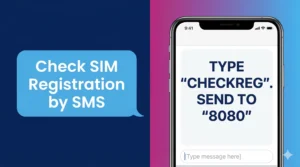
The SMS Method: You can check by sending a specific keyword to 8080. If your sim registered globe status is active, you will receive a confirmation message.
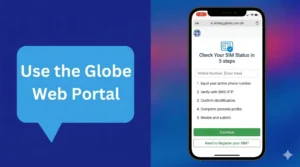
The Portal Check: Re-entering your number into the globe sim register link will often trigger a message saying “This number is already registered.”
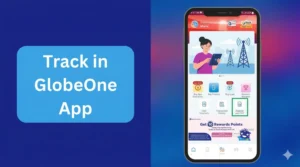
The GlobeOne App Dashboard: This is the most visual way to see if you have a registered globe sim. A green checkmark or badge will appear next to your mobile number in the app.
Understand the “Registered” Status
When your status shows as globe sim registered, it means your data has been successfully validated against the government database. If you see registered sim globe, your line is secure for the next several years, unless the law requires a periodic update.
How to Register Globe SIM For Specific User & Devices ?
Not every registration is a standard mobile phone. Some users need to know how to register globe wifi sim or how to handle accounts for children.
Registering for Minors (Under 18)
If you are looking for how to register globe sim minor, the law requires the SIM to be registered under the name of a parent or legal guardian. The guardian must provide their own ID and sign the consent forms during the digital process.
Globe At Home & Pocket WiFi
For those using broadband, knowing how to register globe at home prepaid wifi sim is vital.
- Connect to the WiFi.
- Access the dashboard at
192.168.254.254. - Retrieve the OTP from the SMS inbox of the dashboard.
- Use that OTP on the register sim globe portal.
Roaming and International Users
If you are currently abroad, you might ask how to register globe sim to roaming. You can still register online as long as you can receive an OTP. If your roaming is not active, you may need to contact Globe customer support via social media to facilitate the register globe sim process while overseas.
Benefits Of SIM Globe SIM Card Registration
Signing up your Globe SIM isn’t just about following the rules , it’s about leveling up your mobile experience. Here is a list of the perks you’ll unlock once you’re officially in the system. User can transfer globe load and data to their friends and family through Pasaload Globe method.
Non-Stop Service
Ensure your line stays active so you never have to worry about a sudden deactivation or losing your connection.
Enhanced Security
Shield yourself from scammers and identity thieves with a layer of official protection linked to your identity.
Exclusive Rewards
Get first dibs on special promos, loyalty points, and “registered-only” deals through the GlobeOne app.
Stress-Free Recovery
If your phone ever goes missing, you can easily claim a replacement SIM while keeping your original mobile number.
Seamless Digital Life
Use your verified number as a secure ID for mobile banking, digital wallets, and other essential apps.
Customer Support
Registered accounts get help much faster because Globe can verify who you are in an instant. you can report issues 24/7 from anywhere.
Troubleshooting Registration Error & Resolution
Sometimes, things go wrong. A common query is “why did my globe sim register failed? Some other errors that occurred are listed below.
- Image Quality: If the ID photo is blurry, the AI cannot read the text. This is the #1 cause of globe sim register failed messages.
- Website Traffic: Sometimes the new.globe.com.ph/sim register link is down due to high volume. Try again during off-peak hours (midnight to 5 AM).
- Not Registered on Network: If you see globe sim not registered on network, it might mean your SIM is already deactivated or damaged. In this case, you must visit a physical Globe store to get a replacement SIM with the same number.
Link Access for TM Users
If you are a TM subscriber, you should use the register sim card tm globe link online registration. Since TM is powered by Globe, the infrastructure is shared. Whether you use the Globe portal or the TM portal, your data reaches the same secure database.
List of Accepted IDs for Globe SIM Registration 2026
The following ID’s are acceptable for all type of Globe SIM Registrations. These ID’s also can be used for online appointment to obtain legal documents at PSA offices.
Conclusion
Every Globe user must complete their SIM registration to keep their mobile service running smoothly. You have the flexibility to sign up through the official website, the mobile app, or by visiting a store in person. The steps are very easy , just fill out your personal info, snap a quick selfie, and upload a photo of your ID.
Once you submit, your data will be verified to make everything official. If you are unsure about your status, you can check it via the portal or by dialing 808. Registering isn’t just a requirement , it also scores you cool perks like bonus reward points. It’s a fast and secure way to protect your number from unauthorized use. Taking a few minutes to do this now prevents your line from being disconnected later. You will enjoy a much more reliable and verified mobile experience once you’re in the system.